Google Ranking Update 2021 – Google's major update focuses on user experience
Loading speed, seamless interactions, and visual stability – user experience now stands alongside technical implementation and content as a significant factor in search engine discoverability.
Google typically doesn't announce its updates in advance. Recently, Big G kindly decided to inform us about a fairly significant update coming next year.
The reason for the advance notice is the COVID-19 situation. Google doesn’t want to cause unnecessary stress for web service administrators in already challenging times and hence is postponing the update to next year. This update seems quite straightforward.
"Evaluating page experience for a better web" – honouring user experience
You can deduce the update's guiding principle from the quoted title: Google appears to be placing greater emphasis on site speed and user experience going forward.
In this context, user experience can be divided into three clear areas, which should start being monitored in your own web service right now.
Loading speed
Interactivity
Visual stability
This triad is related to the recently released Core Web Vitals metrics, which are tools for analysing a site's usability through automated means.
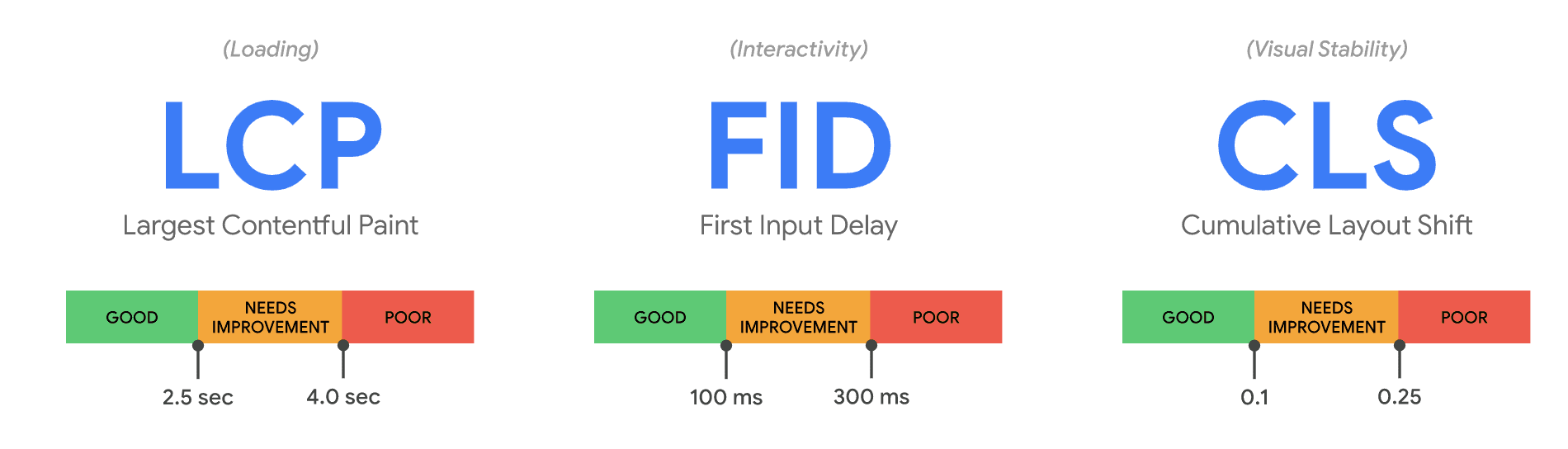
Image: Google.
Web service loading speed (Largest Contentful Paint, LCP)
LCP stands for Largest Contentful Paint and measures the loading speed of the most important content on the web service. Research suggests the web service should be operational and usable in about 2.5 seconds.
The primary contents, including images and videos, should be available rather briskly, even if the "tail" of the page is still loading in the background. This value does not refer to a 100% complete page, but to the time when the visitor has key content ready and operational on their screen.
You can easily test your web service's loading speed using the Google PageSpeed Insights tool. If the LCP value remains in the green, i.e., under 2.5 seconds, the result is good.
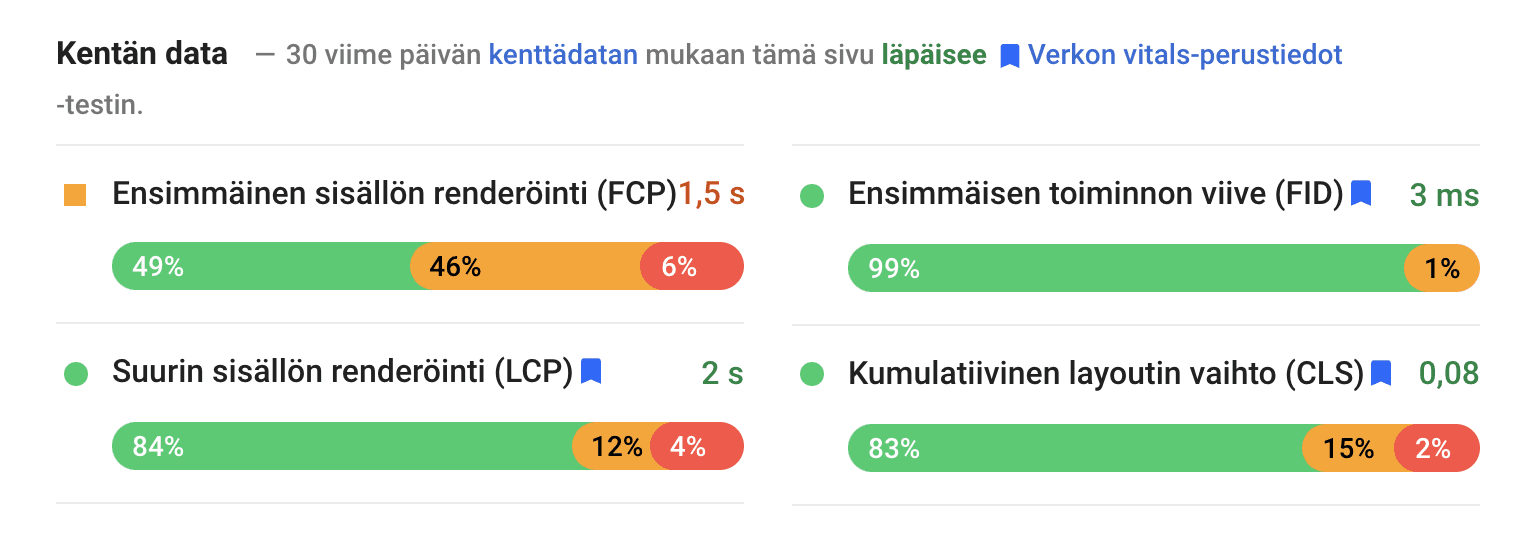
Image above: If you are familiar with the PageSpeed Insights tool, you will notice changes in the metrics. The new metrics are marked with the "Web Vitals" label.
Website interactivity (First Input Delay, FID)
It is crucial for the site to respond quickly to user actions – the assumption is that when a person presses a button, things start happening!
Delays preceding interactivity are measured by First Input Delay, FID. The value should remain under 100 milliseconds on individual pages.
In summation: no user interactions should have noticeable delays.
Visual stability (Cumulative Layout Shift, CLS)
Let me quote an animation from Google here because it so perfectly encapsulates the problem of unstable visuals!
This issue concerns buttons and links that change position as the site loads.
You've probably encountered a situation, especially on mobile, where a button slips away from under your thumb or changes position just before pressing. Even in its smallest form, it’s annoying, but in e-commerce, content jumping around on the screen can lead to incorrect orders or cancellations.
The official term is Cumulative Layout Shift, CLS. This technique measures changes in the user interface; progression through a shopping cart is a very practical example.
The most common reason for a jumping interface is background content loading, which changes the position of elements, particularly vertically. Technically, these changes are relatively easy to measure, allowing a sensible threshold value for CLS to be defined. An acceptable result on a scale of 0-1 is 0.1.
A fast web service and good user experience enhance search engine discoverability
Google prioritizes pages using hundreds of algorithms. Site speed and mobility have been factors affecting site rankings for quite some time, but now usability has also been surrounded by reasonable-looking metrics.
If – and when – your own web service's speed data interests you, you can perform a quick analysis in a few minutes as follows:
Enter the address of the page to be tested and run the test.
The more green you see, the better your site looks in Google's eyes
The "Recommendations" and "Diagnostics" lists let you explore what might be causing any slowdowns. Very often the culprits are images and javascript.
It is impossible to give a one-size-fits-all correction guide because everything depends on the platform and technologies used in the web service.
PS. /Ed. Note / Afterthoughts
What makes this update interesting is Google's unusual advance announcement: we live in unusual times, but the update itself will also be impressive.
Currently, most web services still struggle with mobile speed – the update will likely further highlight these issues, especially if the web service is large or technologically outdated.
One might exaggeratedly say that previous Google updates could be survived with a little tweaking and content production, but now many web services – especially e-commerce – might face more significant renovations.
But as before: keep a level head, learn about the topic, examine your pages, and ask the tech experts if it goes over your head!

Anni Laine
People & Culture Manager